Keysight Test Automation Cloud Dashboard

ROLE: UX Researcher, UI/UX Designer

TOOLS: Figma, Figma Make, Notion, Qualtrics, After Effects

DURATION: 9 months

PathWave Test Automation Cloud Dashboard

ROLE: UX Researcher, UI/UX Designer

TOOLS: Figma, Figma Make, Notion, Qualtrics, After Effects

DURATION: 9 months

PathWave Test Automation Cloud Dashboard

ROLE: UX Researcher, UI/UX Designer

TOOLS: Figma, Figma Make, Notion, Qualtrics, After Effects

DURATION: 9 months

OVERVIEW

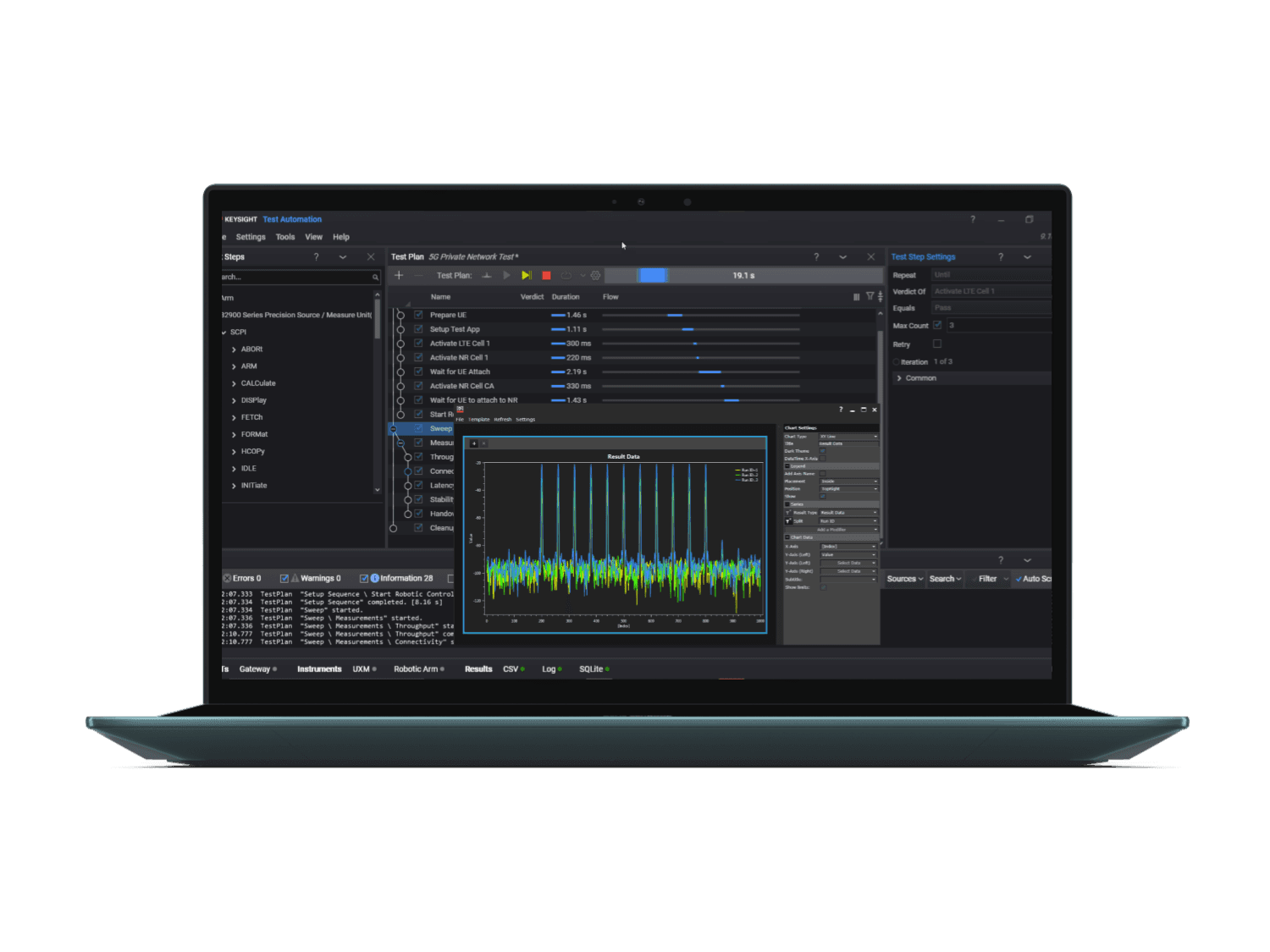
Keysight’s PathWave Test Automation Cloud is a browser-based platform that enables distributed engineering teams to remotely control lab equipment, run tests, and analyze data from anywhere in the world. As part of my M.S. Capstone project, I worked with two teammates, leading UX research and design. We conducted interviews, usability tests, and surveys with engineers and lab managers to uncover critical pain points in remote lab workflows and translated insights into designs that improved task efficiency and user satisfaction. This case study does not include any confidential information from Keysight Technologies.

OVERVIEW

Keysight’s PathWave Test Automation Cloud is a browser-based platform that enables distributed engineering teams to remotely control lab equipment, run tests, and analyze data from anywhere in the world. As part of my M.S. Capstone project, I worked with two teammates, leading UX research and design. We conducted interviews, usability tests, and surveys with engineers and lab managers to uncover critical pain points in remote lab workflows and translated insights into designs that improved task efficiency and user satisfaction. This case study does not include any confidential information from Keysight Technologies.

OVERVIEW

Keysight’s PathWave Test Automation Cloud is a browser-based platform that enables distributed engineering teams to remotely control lab equipment, run tests, and analyze data from anywhere in the world. As part of my M.S. Capstone project, I worked with two teammates, leading UX research and design. We conducted interviews, usability tests, and surveys with engineers and lab managers to uncover critical pain points in remote lab workflows and translated insights into designs that improved task efficiency and user satisfaction. This case study does not include any confidential information from Keysight Technologies.

If you'd like to talk through the details or ask questions about this project, I'm always happy to chat! Feel free to contact me on Linkedin or through email to learn more.

If you'd like to talk through the details or ask questions about this project, I'm always happy to chat! Feel free to contact me on Linkedin or through email to learn more.

THE CHALLENGE

THE CHALLENGE

Fragmented Workflows & Information Overload

Fragmented Workflows & Information Overload

Test automation dashboards are notoriously dense. Pass/fail rates, runtimes, coverage gaps… all critical data, but presented in a way that makes engineers and lab managers work harder instead of smarter. Users of PathWave were spending more time interpreting charts than fixing problems, with some even having to build their own workarounds or juggle multiple tools and methods to keep track of tasks, test data, and high-priority items. 

Test automation dashboards are notoriously dense. Pass/fail rates, runtimes, coverage gaps… all critical data, but presented in a way that makes engineers and lab managers work harder instead of smarter. Users of PathWave were spending more time interpreting charts than fixing problems, with some even having to build their own workarounds or juggle multiple tools and methods to keep track of tasks, test data, and high-priority items. 

Over the course of 9 months, my teammates and I were tasked with designing a cohesive and intuitive experience for test automation teams in the form of a role-aware, centralized dashboard to help interpret data faster, support smarter decision-making, reduce friction, and foster effective collaboration. We worked directly with industry sponsors from Keysight as well as a student engineering team.

Over the course of 9 months, my teammates and I were tasked with designing a cohesive and intuitive experience for test automation teams in the form of a role-aware, centralized dashboard to help interpret data faster, support smarter decision-making, reduce friction, and foster effective collaboration. We worked directly with industry sponsors from Keysight as well as a student engineering team.

RESEARCH METHODS

RESEARCH METHODS

Uncovering Pain Points and Opportunities

Uncovering Pain Points and Opportunities

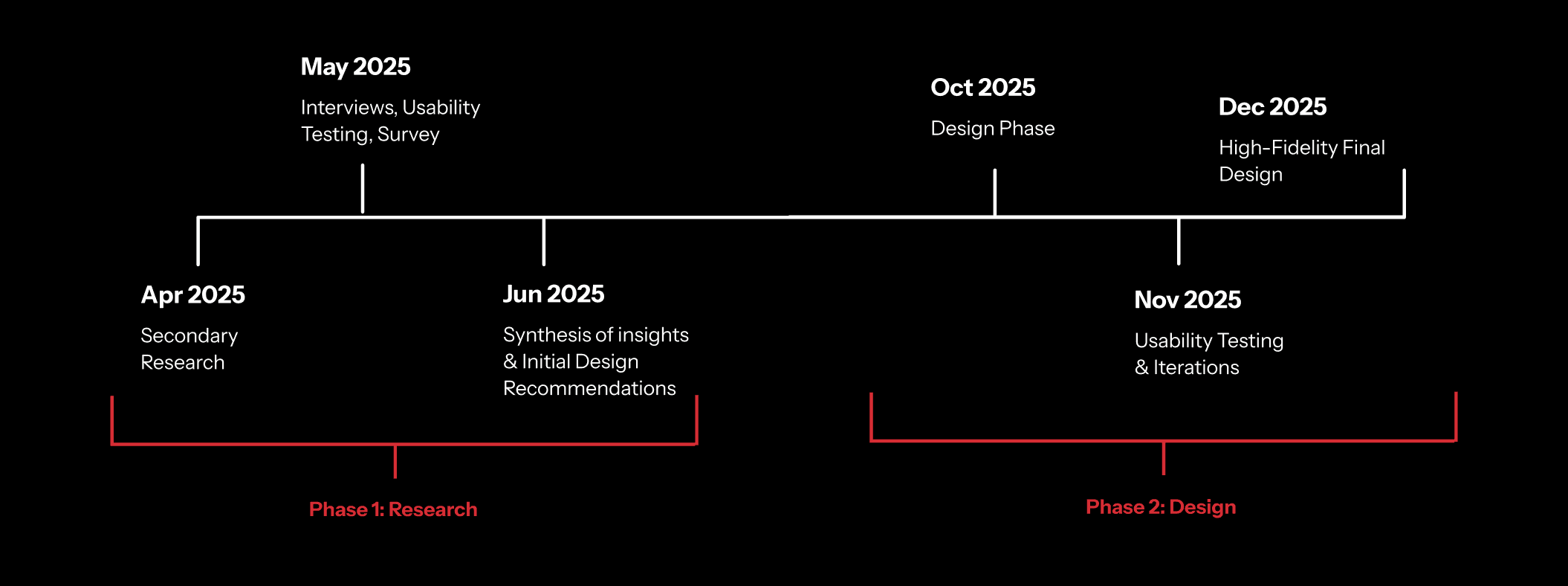
Before talking to users, we did our homework: 6 literature reviews on the product space, analysis of 12 competitors (direct and indirect), and a detailed research brief with a roadmap that would keep us on track.

Before talking to users, we did our homework: 6 literature reviews on the product space, analysis of 12 competitors (direct and indirect), and a detailed research brief with a roadmap that would keep us on track.

Project Roadmap

Then we got to work and implemented our methodology:

  • 7 exploratory user interviews to uncover workflows, needs, and frustrations.

  • 4 usability tests & system usability scale surveys on the initial prototype.

  • 50+ survey responses to validate patterns at scale, distributed at a company event.

Then we got to work and implemented our methodology:

  • 7 exploratory user interviews to uncover workflows, needs, and frustrations.

  • 4 usability tests & system usability scale surveys on the initial prototype.

  • 50+ survey responses to validate patterns at scale, distributed at a company event.

RESEARCH INSIGHTS

RESEARCH INSIGHTS

Key Themes & Initial Recommendations

Key Themes & Initial Recommendations

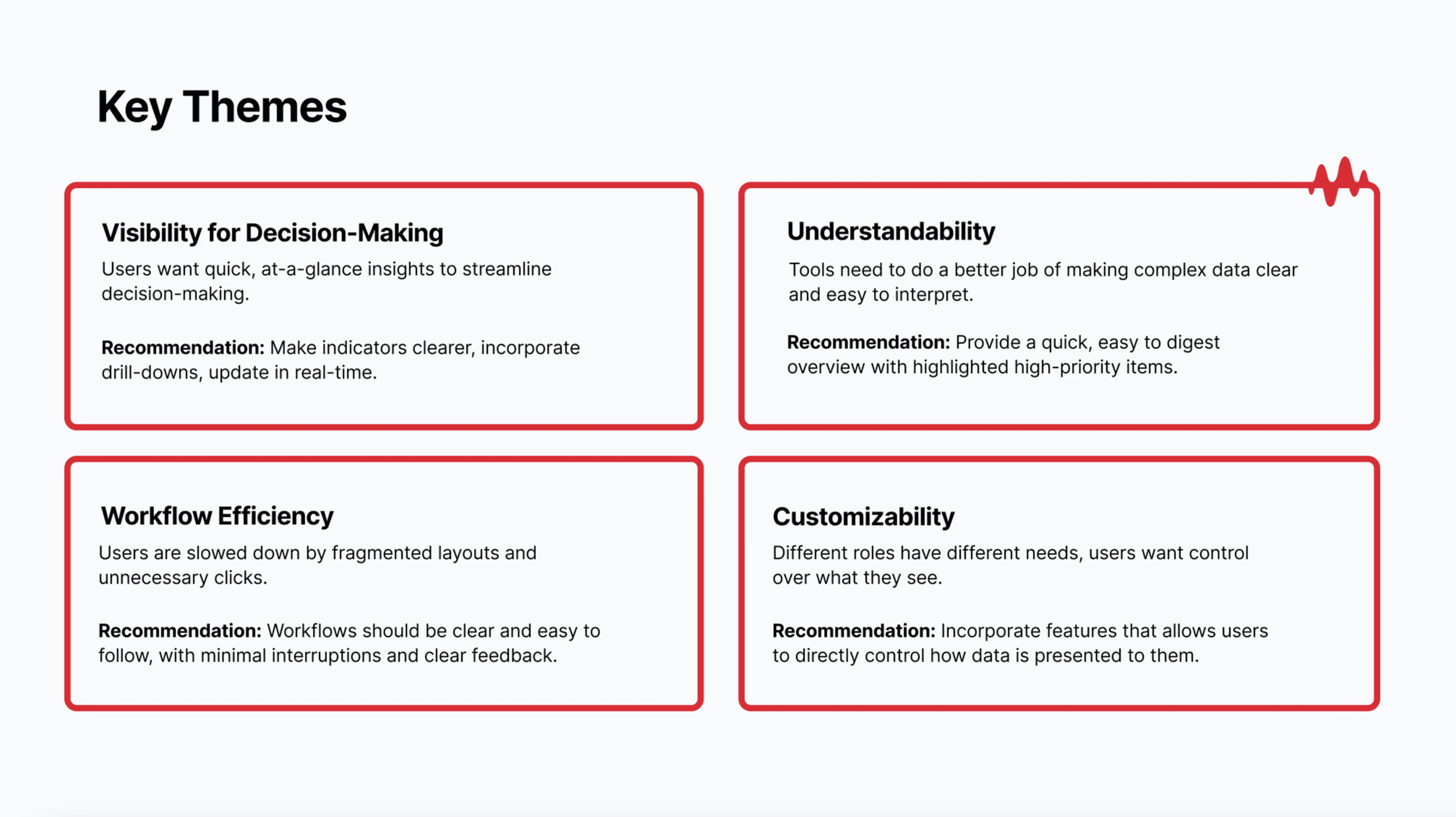
After analyzing the data through thematic coding, affinity mapping, and user journey mapping, we identified 4 key themes:

After analyzing the data through thematic coding, affinity mapping, and user journey mapping, we identified 4 key themes:

Key Themes & Design Recommendations

This led us to the following initial design recommendations:

  • Make indicators clearer, incorporate drill-downs, update in real-time.

  • Provide a quick, easy to digest overview with highlighted high-priority items.

  • Workflows should be clear and easy to follow, with minimal interruptions and clear feedback.

  • Incorporate features that allows users to directly control how data is presented to them.

This led us to the following initial design recommendations:

  • Make indicators clearer, incorporate drill-downs, update in real-time.

  • Provide a quick, easy to digest overview with highlighted high-priority items.

  • Workflows should be clear and easy to follow, with minimal interruptions and clear feedback.

  • Incorporate features that allows users to directly control how data is presented to them.

We decided to organize our ideas around these 4 themes to prevent siloed feature development. During ideation, we examined how different features could complement each other across various workflows. This approach transformed our initial collection of scattered ideas into comprehensive, interconnected system concepts.
PLATFORM SWITCH

PLATFORM SWITCH

Adapting to Change

Adapting to Change

Midway through the project, our industry sponsors informed us that they would be shifting to a different open-source technical platform. This meant taking everything we'd learned from our UXR phase and translating it to a new foundation. Rather than starting from scratch, we used our previous insights as a north star. The core problems didn't change just because the technology did!

Midway through the project, our industry sponsors informed us that they would be shifting to a different open-source technical platform. This meant taking everything we'd learned from our UXR phase and translating it to a new foundation. Rather than starting from scratch, we used our previous insights as a north star. The core problems didn't change just because the technology did!

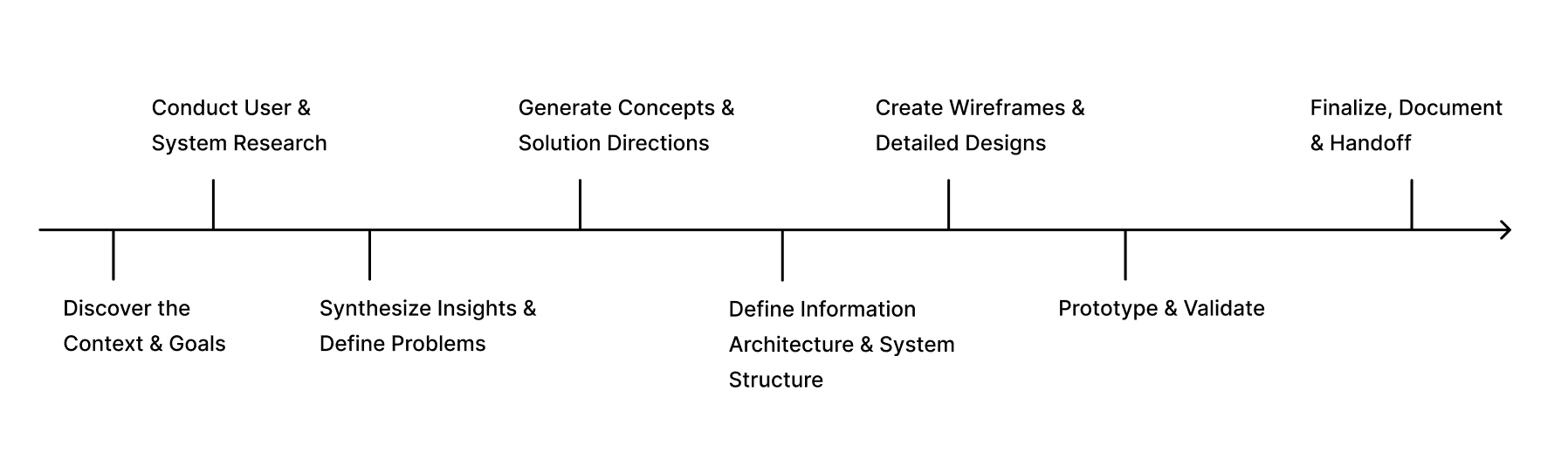
Phase 2 Project Roadmap

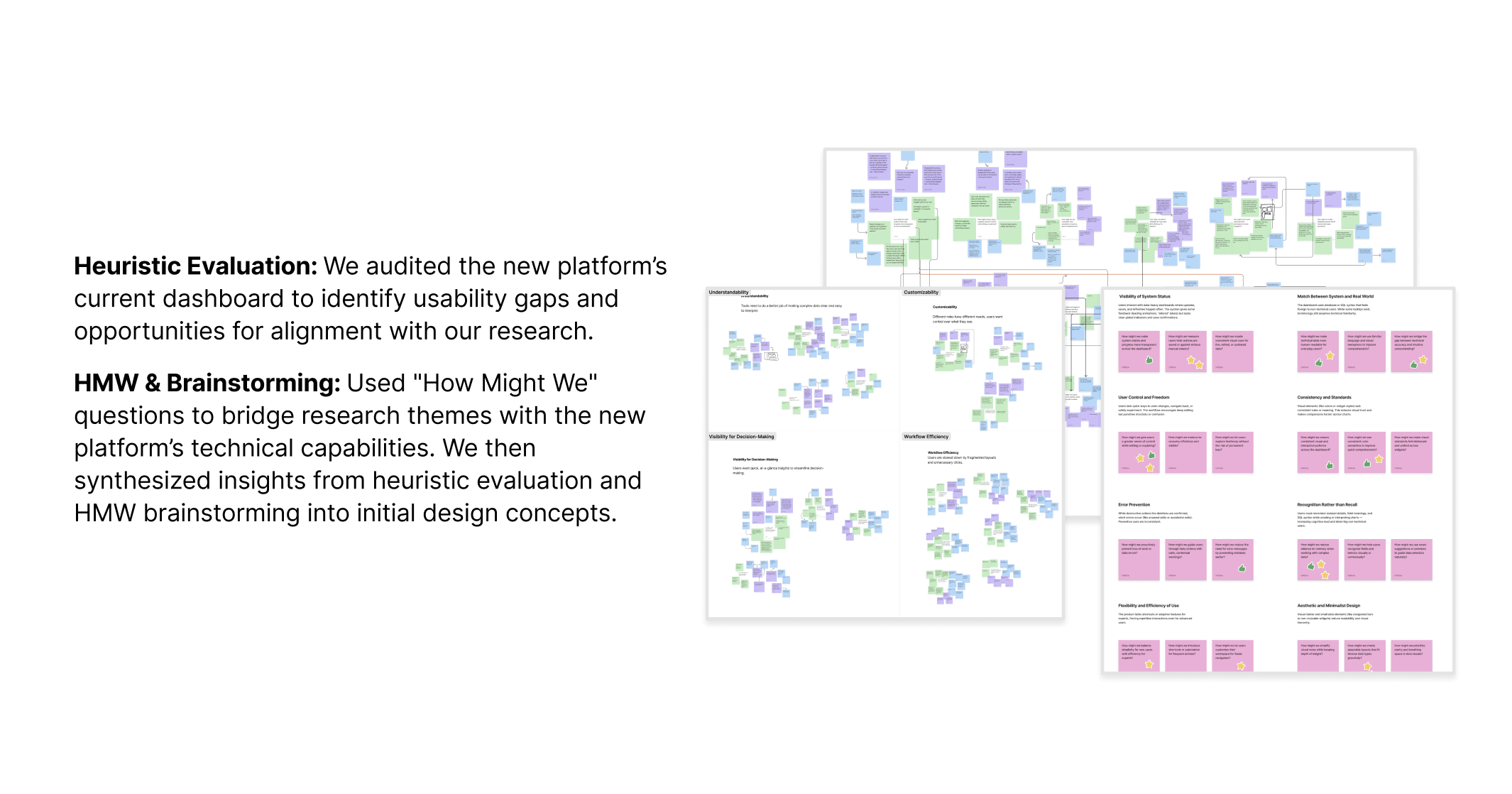
We spent the second half of the project re-evaluating our recommendations and designing for the new platform. We developed five features, three of which were AI-powered. AI wasn't about automation for its own sake. It was about filtering signal from noise and translating metrics into actionable decisions. We also created a structured Information Architecture map to establish a clear, organized blueprint for our designs.

We spent the second half of the project re-evaluating our recommendations and designing for the new platform. We developed five features, three of which were AI-powered. AI wasn't about automation for its own sake. It was about filtering signal from noise and translating metrics into actionable decisions. We also created a structured Information Architecture map to establish a clear, organized blueprint for our designs.

Frameworks For Re-orientation & Ideation
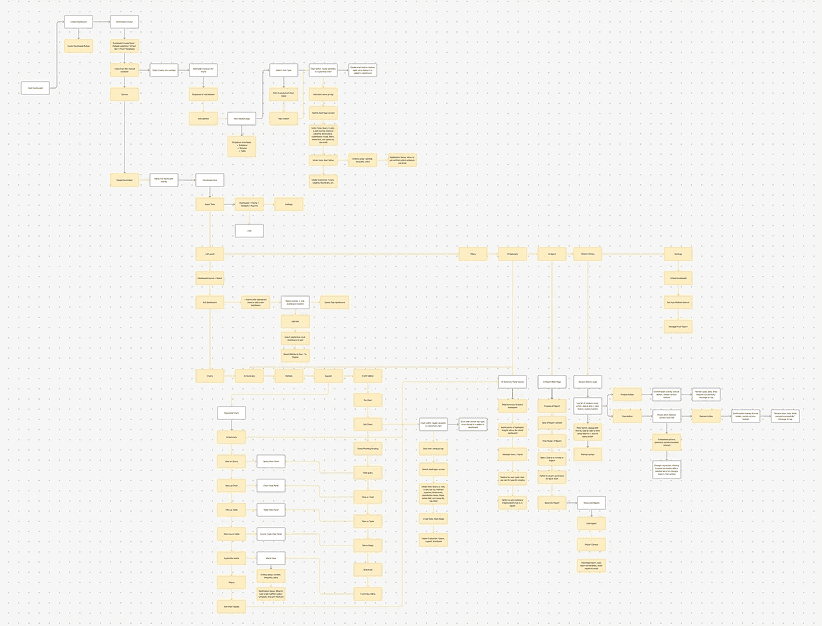
Information Architecture Map

To validate and refine our concepts, we tested wireframes and high-fidelity prototypes with test engineers, lab managers, and users in similar roles across two rounds of remote usability testing. This surfaced these key learnings:

  1. Customizability to give users more control → Users preferred being given the option to do tasks manually instead of fully relying on AI features to complete them, and have the capability to manipulate and modify their views.

    • So, we provided space for the user to complete their tasks, having AI features provide users flexibility and play an assisting role rather than do everything for them.

  2. Traceability to validate information → Users wanted a way to trace and validate information given to them by AI-driven features as a way to build trust in the feature's capabilities.

    • So, we consolidated AI-driven insights in a dedicated section and provided direct methods to validate it.

  3. Context to build understandability → Users desired more context about a feature's capabilities so they both understand what the feature does and how it can help them achieve their task. Users also want more ways to modify content to achieve a desired content and information depth.

    • So, we improved descriptions of features and added tooltips. We included features that help users to improve content.
FINAL DESIGNS

FINAL DESIGNS

What We Built

What We Built

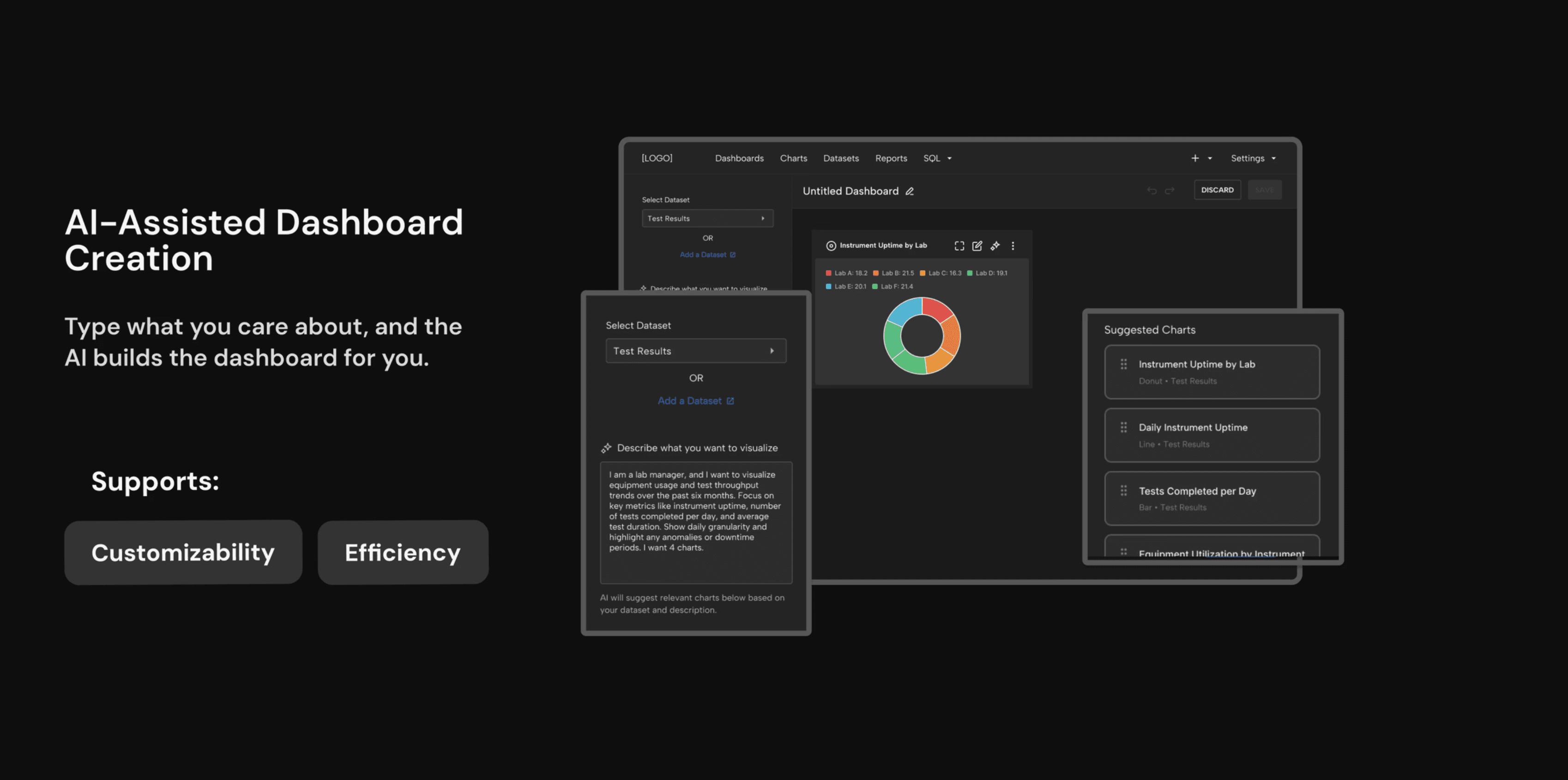
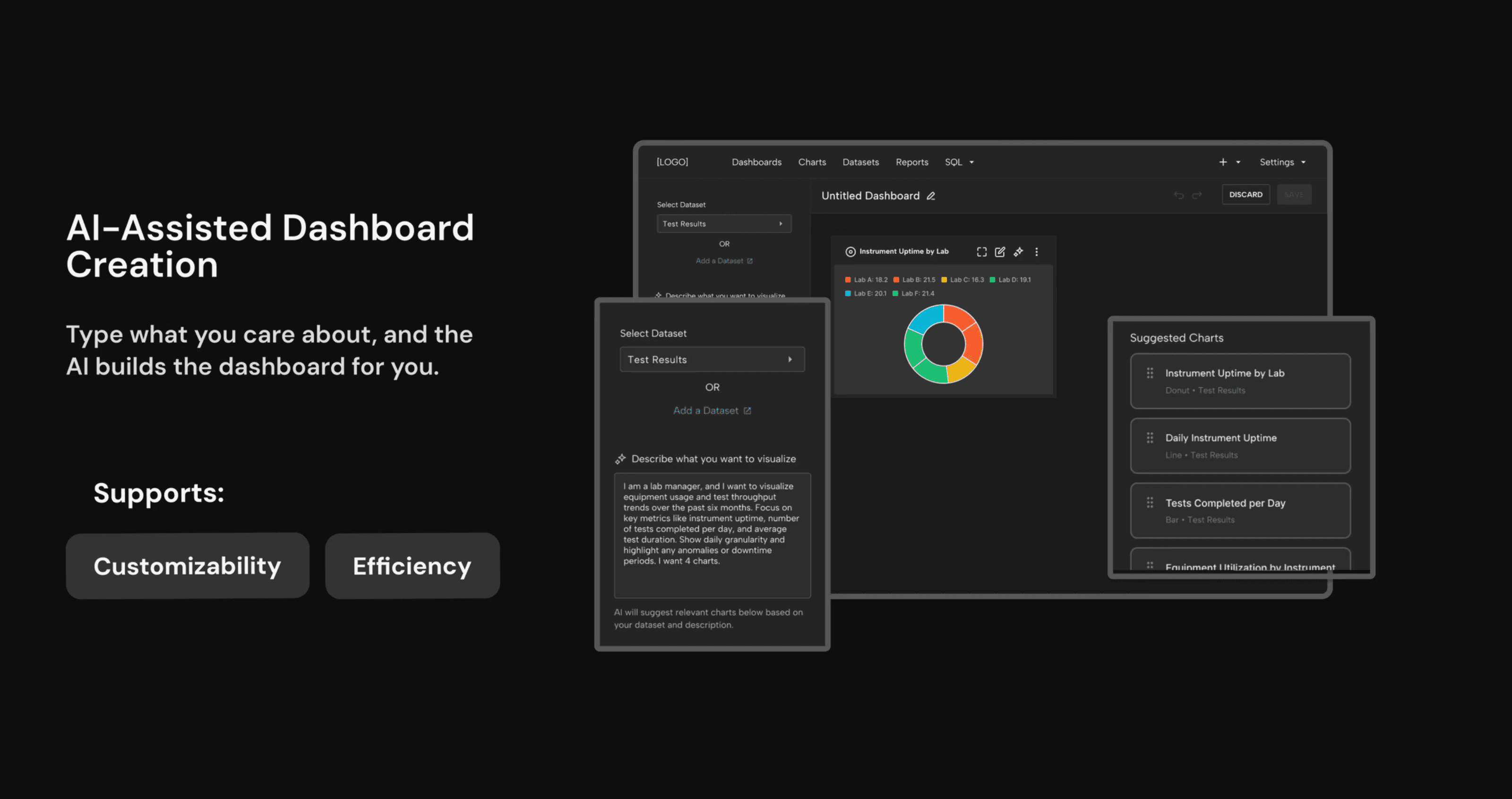
  1. AI-Assisted Dashboard Creation: Users can either manually add charts or describe their goals in natural language in an AI prompt box. The AI delivers chart suggestions based on the user's input and the dataset they selected or uploaded.

  1. AI-Assisted Dashboard Creation: Users can either manually add charts or describe their goals in natural language in an AI prompt box. The AI delivers chart suggestions based on the user's input and the dataset they selected or uploaded.

  1. Drill-downs & AI Summaries: An AI Summary panel provides insights across the dashboard. These insights come with pointers that guide users to the data and charts related to it. These pointers act as a guide for users during drill-downs. In the drill-down view, the AI Summary panel also provides in-depth insights about the chart itself.

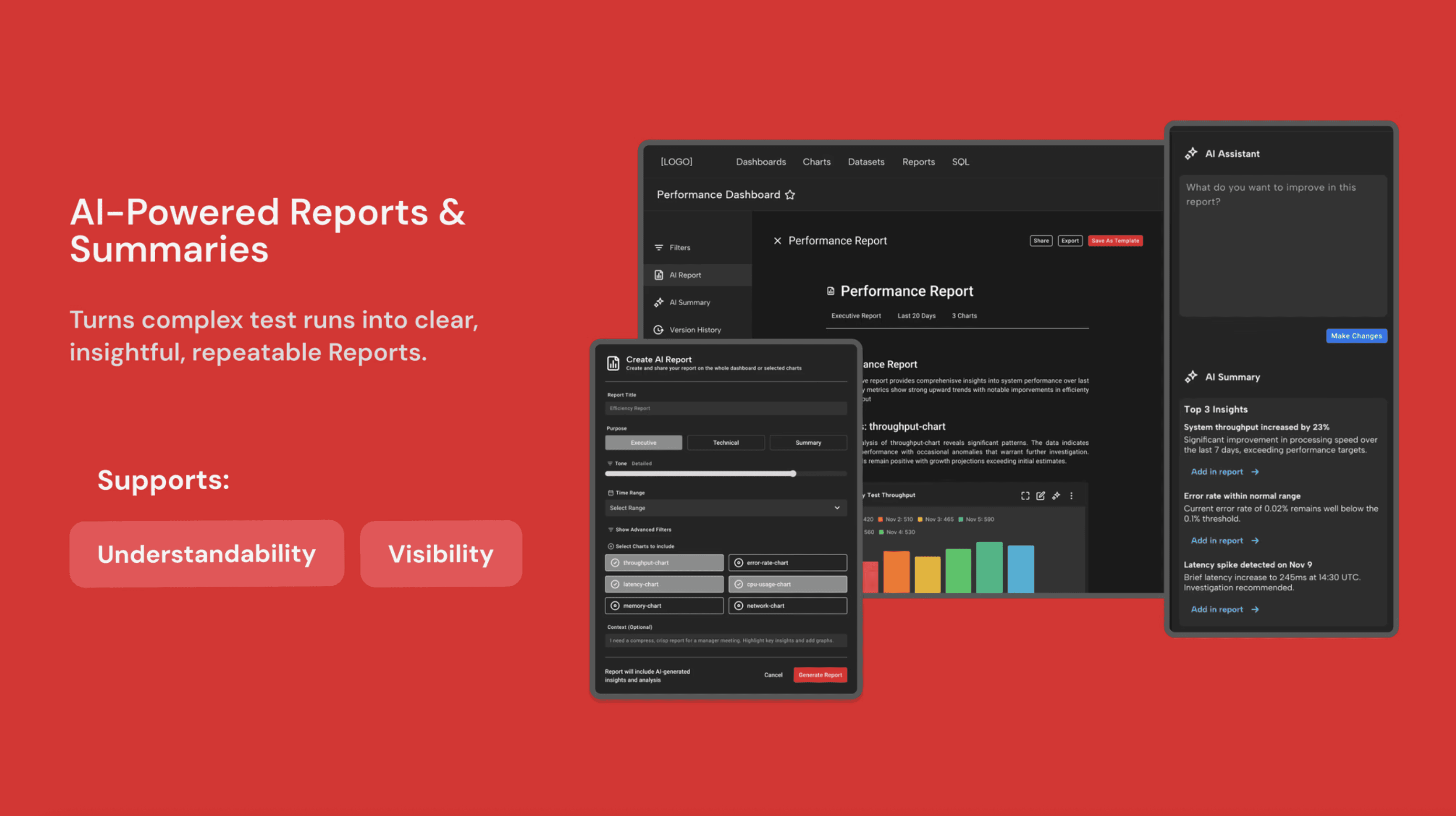
  2. AI Reports: This feature helps users to compile dashboard activity into precise, insightful reports. Users can control for the level of detail and what content to include on the report during creation. After, users can edit and modify the report and add insights from the AI Summary panel. The report can be shared, exported, or saved as a template for future use.

  1. Drill-downs & AI Summaries: An AI Summary panel provides insights across the dashboard. These insights come with pointers that guide users to the data and charts related to it. These pointers act as a guide for users during drill-downs. In the drill-down view, the AI Summary panel also provides in-depth insights about the chart itself.

  2. AI Reports: This feature helps users to compile dashboard activity into precise, insightful reports. Users can control for the level of detail and what content to include on the report during creation. After, users can edit and modify the report and add insights from the AI Summary panel. The report can be shared, exported, or saved as a template for future use.

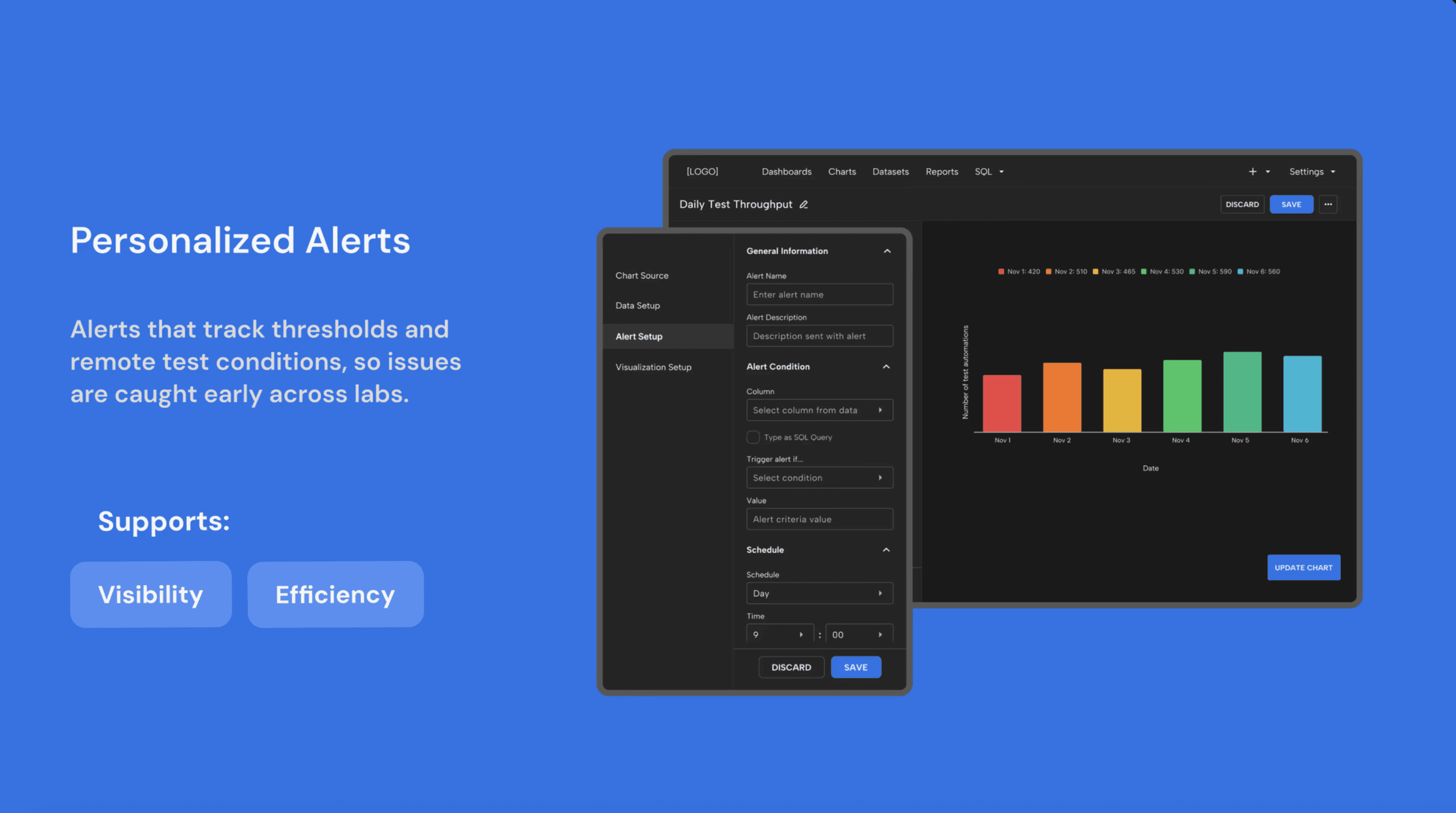
  1. Personalized Alerts: Users can add alerts to catch threshold spikes and anomalies, providing visibility before they escalate. Alerts can be accessed on the dashboard with a link to the related data.

  1. Personalized Alerts: Users can add alerts to catch threshold spikes and anomalies, providing visibility before they escalate. Alerts can be accessed on the dashboard with a link to the related data.

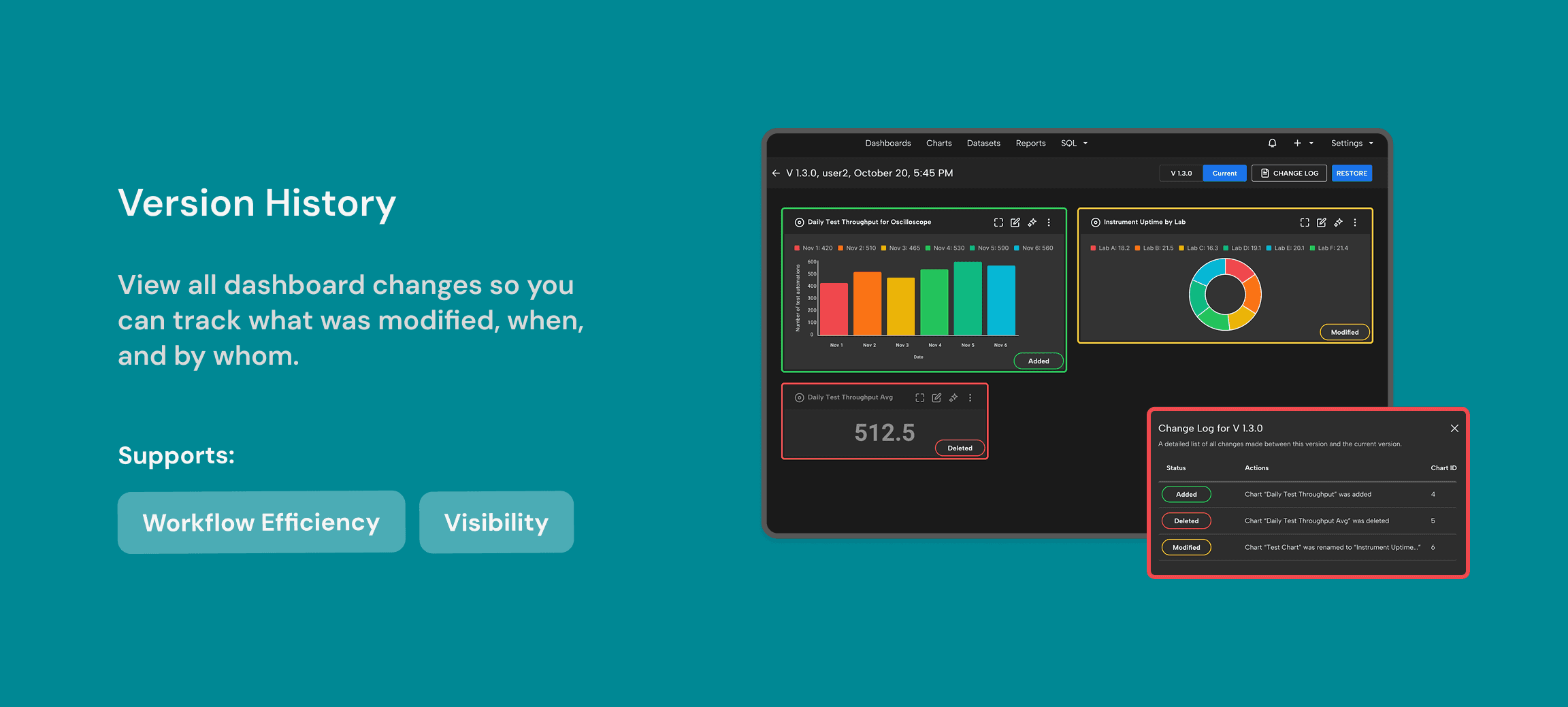
  1. Version History: A log of dashboard changes so teams can track what was modified, when, and by whom. They can also easily and quickly restore a previously saved version of a dashboard without having to rebuild it.

  1. Version History: A log of dashboard changes so teams can track what was modified, when, and by whom. They can also easily and quickly restore a previously saved version of a dashboard without having to rebuild it.

Ultimately, our research insights and design recommendations helped reframe how Keysight thought about AI in workplace tools: not as a replacement for expertise, but as a way to make workflows faster, more tailored, and more efficient while keeping humans in control.
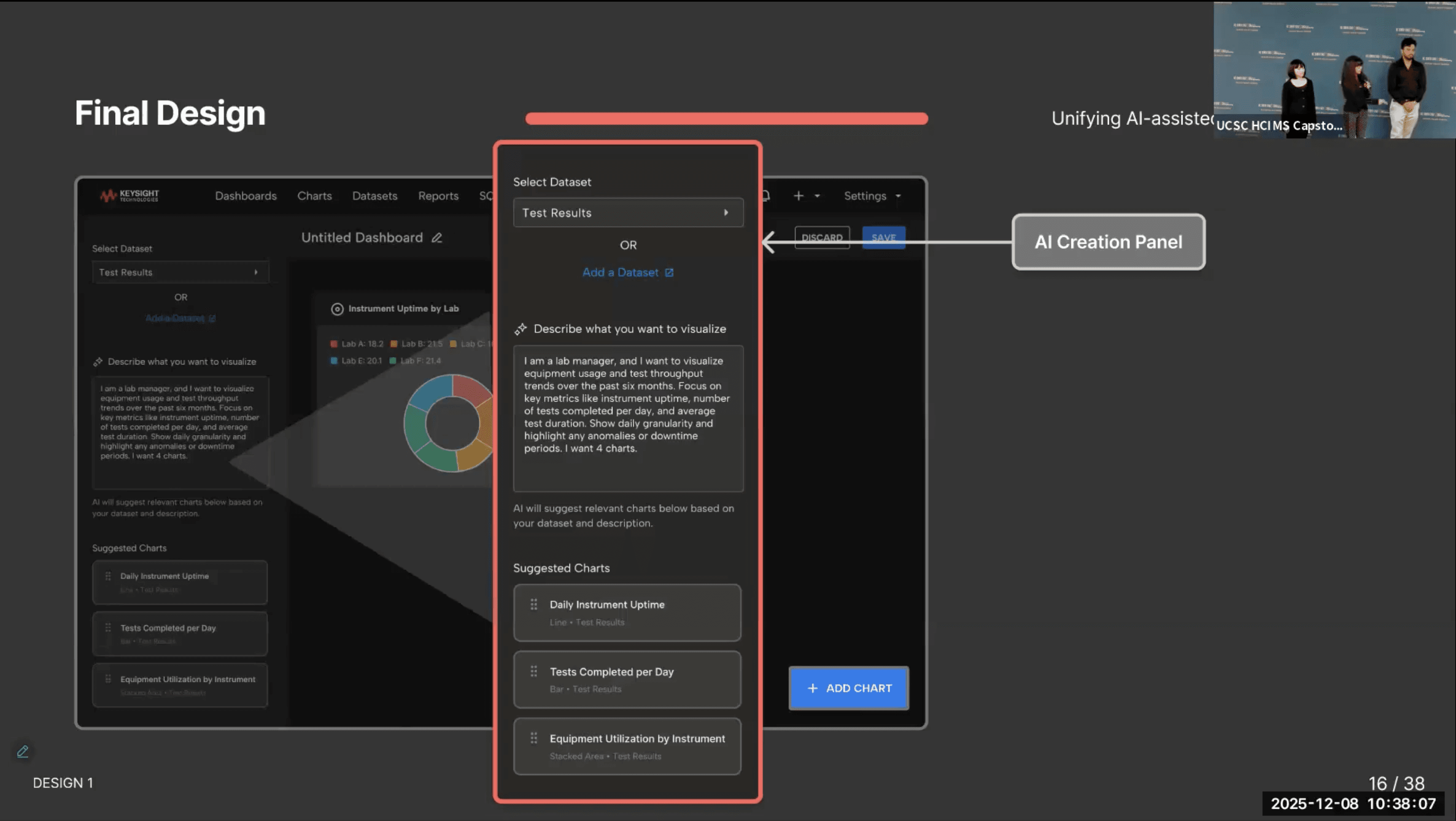
Snapshot From Our Final Project Presentation
Ⓒ MAAYA GEORGE 2025

Ⓒ MAAYA GEORGE 2025

Ⓒ MAAYA GEORGE 2025